
Teamwork.com 
A Work Management Platform with Project Goals
Best For: Organizations of all sizes


Overview
Teamwork.com is a project management tool that helps teams deliver client work efficiently, profitably, and happily.
The platform helps users deliver projects and manage operations using features based on planning, progress views, collaboration, reporting, automation, and integrations.
Any organization can use this platform. It’s not a goal-setting platform, but you can set milestones or goals in the Projects module.
Here, you will explore the key features, the pros and cons based on hands-on usage, and user reviews about Teamwork.com. You will also read about its pricing and support options.
Teamwork.com Rating
Teamwork.com Review
Pros
- Effortless Integration and User-Friendly Interface: Teamwork.com boasts an intuitive interface. It is easy to set up and use, minimizing the need for extensive training and allowing teams to focus on achieving goals quickly.
- Centralized Hub for Tasks and Goal Tracking: It acts as a central location for managing tasks, deadlines, and milestones associated with your OKRs.
- Data-Driven Decisions with Real-Time Analytics: It provides real-time project analytics. You have access to up-to-date insights on progress towards your goals.
- Enhanced Collaboration with External Stakeholders: It allows you to grant access to external organizations or clients. This promotes transparency, alignment, and a united effort towards achieving shared objectives.
- Staying on Top of Deadlines with Timely Notifications: It delivers timely automatic notifications. This ensures everyone is informed and holds each other accountable for achieving goals within the set timeframes.
Cons
- Limited AI Features: Teamwork.com’s CRM functionality does not currently leverage Generative AI. While it offers core functionalities, it might not be on par with platforms utilizing advanced AI for streamlining workflows.
- Mobile App Shortcomings: The mobile UI needs improvement.This limits flexibility and on-the-go access for users who prefer working from their smartphones or tablets.
- Potential Information Overload in Comments: The platform struggles to present information when a task accumulates many comments. This can hinder communication efficiency.
- Limited Flexibility in Deadlines and Milestones: It is rigid when it comes to adjusting deadlines and milestones. You cannot modify established deadlines or milestones as circumstances evolve. This lack of flexibility is not ideal for dynamic projects.
- Limited Customization in Gantt Charts: The Gantt chart feature offers limited customization options. You cannot tailor the chart to visualize project timelines according to your specific preferences.
Teamwork.com Pricing
Explore all the pricing plans of Teamwork.com
Teamwork.com provides four plans: Free, Deliver, Grow, and Scale based on the team size and amount of work to be managed.
Let’s take a look at the features of Teamwork.com’s Deliver plan.
Price comparison
Teamwork.com cannot be compared to OKR management software at all. It is specifically designed for teams to manage their work with a client and internal teams’ daily operations.
Teamwork.com Features
1. Goal-setting and Alignment
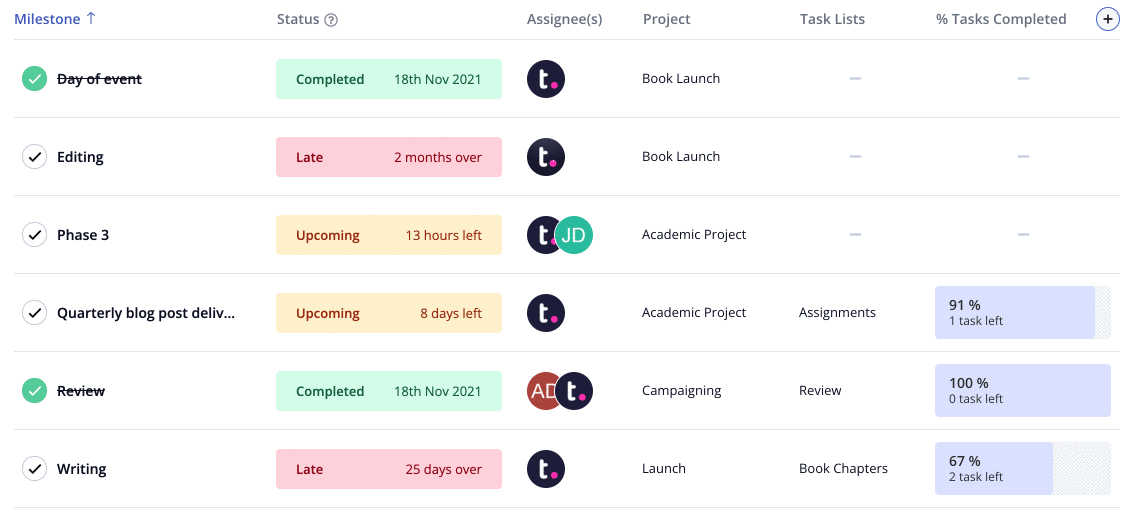
Teamwork.com allows you to define project milestones that serve as benchmarks for completing your projects. This visualizes the project roadmap toward achieving your objectives and ensures everyone on the team understands the concrete actions needed for success.
All the other features on Teamwork.com are related to Project Management. So, it does not make sense to mention those details here.
Conclusion
Teamwork.com cannot be compared to OKR software because it is built to manage projects and tasks. So, any OKR platform in the market can be much more helpful than this tool.
This is not technically a detailed review, as Teamwork.com is irrelevant for those who want to manage OKRs efficiently among their team members. It makes your choice straightforward – whether to use Teamwork.com for OKR management.
Frequently Asked Questions
Can Teamwork.com integrate with popular tools such as Slack and Microsoft Teams?


Yes, Teamwork.com is designed to enhance collaboration and productivity by integrating various popular tools.
Is Teamwork.com OKR software appropriate for both small and large businesses?
No, Teamwork.com is not an OKR management software.
What onboarding, support, and continued coaching does Teamwork.com provide?
Teamwork.com provides a wealth of resources and customer support to use the platform effectively.
Does Teamwork.com include templates and examples for setting effective OKRs?
Yes, Teamwork.com provides some OKR examples on their blogs.
Can we try a free trial to test if Teamwork.com is user-friendly for our teams?
Yes, Teamwork.com offers a free plan for small teams (up to 5 users). Additionally, it offers a 30-day free trial for larger teams.
What are the alternatives to Teamwork.com?
- JOP (Joy of Performing)
- Monday.com
- Asana
- ClickUp
- Wrike


